Monday, September 28, 2026

From FTC.GOV - What to know ahead of Open Enrollment to avoid health insurance scams

 What to know ahead of Open Enrollment to avoid health insurance scams

September 28, 2026

Health insurance scams happen year-round, but they pick up during Open Enrollment for Medicare and the Marketplace. If you’re looking to find a new plan, you might search online. But before you click on a search result, remember: scammers and dishonest businesses sometimes pay to appear at the top.

Bad actors often use web addresses that look similar to government website addresses. They also use keywords and official-looking logos to make you think you’re at the real Healthcare.gov or Medicare.gov when you’re not. If you use the link or phone number in the ad, you might end up paying for a scammy plan that’s not health insurance, or expose yourself to medical identity theft. 

How can you avoid health insurance scams as you search for options? 

Type the name of the website directly into the search engine. For Medicare, it’s Medicare.gov, or call 800-633-4227. To compare health insurance plans, check your coverage, or find out if you qualify for savings, go to HealthCare.gov or call 800-318-2596.

Take your time. Look for small “Ad” or “Sponsored” labels next to search results to identify paid ads. Scroll past paid ads and be sure to look for the .gov ending. 

Get help to compare costs, coverage, and plans. You can also get Medicare help through your State Health Insurance Assistance Program (SHIP) or local Senior Medicare Patrol. For additional help with ACA plans, visit HealthCare.gov and click “Find Local Help.”

Learn more. Join a roundtable conversation about Medicare and healthcare-related scams with representatives from the FTC, Centers for Medicare and Medicaid Services, and the Senior Medicare Patrol on September 29, 2026 at 1pm ET.

Suspect a health insurance scam? Tell the FTC at ReportFraud.ftc.gov and your state attorney general. If the scam involves Medicare, report it at Medicare.gov or 800-633-4227.

Are You Being 'Spoofed'? This Specific Type Of Scam Is Hard To Catch.


Are You Being 'Spoofed'? This Specific Type Of Scam Is Hard To Catch.

This sneaky, insidious act tricks you into sharing personal information — and it's all too easy to fall for. Here's how to spot it.
Spoofing scams are all too common, and they work because they take advantage of our trust.
rob dobi via Getty Images
Spoofing scams are all too common, and they work because they take advantage of our trust.

Scammers win when they trick you into divulging personal information ― and one of the simplest ways they can get you to do this is by impersonating someone you know.

When a bad actor pretends to be someone you trust or a legitimate retailer, this type of scam is known as “spoofing.” With spoofing, scammers take advantage of “the fear and the curiosity that we have that this is somebody we know,” said Amy Nofziger, the director of victim support for the AARP Fraud Watch Network.

One common tactic in a spoofing scam is to make an email address, text message, website or phone number appear like it’s the real deal. But even though it might have a similar or exact same display name, domain address or use the same call-to-action button as a trusted business, politician or boss, it’s actually all a deceptive act to convince you into downloading malware or giving up your financial information.

Often, the trickery can only be revealed through minor details. Here are some of the most common ways you will encounter spoofing and what to watch out for:

Phone Spoofing

Phone spoofing can be hard to spot because there are apps that can replicate caller IDs so that they can carry the display name of people you know, as well as the local area codes that you are familiar with.

Don’t trust what you hear, either. In a 2023 “60 Minutes” segment, an ethical hacker used an app to create an AI-generated recording that mimicked the voice of one of the show’s correspondents. Through this eerie likeness, the hacker was able to successfully ask a colleague to share that correspondent’s passport number in a phone call.

In these cases, “the best thing you could do is say, ‘I gotta call you right back,’ even if it’s just one minute,” said Cliff Steinhauer, the director of information security and engagement for the National Cybersecurity Alliance.

In the example of the “60 Minutes” colleague who got fooled, “if the [co-worker] had hung up and called her boss back, she would have gotten her boss, not the attacker.” To help prevent this kind of spoofing, set up a code word you can ask for as a verifying test, Steinhauer suggested.

Overall, the big telltale sign that the caller is a scammer is not in how legitimate they appear or sound, but in what they are telling you to do. It can be normal to receive a random call that shares information with you like a prescription available for pickup from the pharmacy. But you should be suspicious if the caller urgently needs you to give up sensitive information in order to continue the conversation.

“If they’re saying, ‘Your child is hurt and you need to send us an insurance payment right now with prepaid gift cards or cryptocurrency,’ they’re asking you for something, and that’s the biggest red flag,” Nofziger said.

Email Spoofing

Upon first glance, a spoofed email may look reliable. Scammers will often use sender addresses that look like it’s coming from a known company or authority figure.

Sometimes, a tiny typo can be the biggest clue that something is amiss, so watch out for emails that have misspellings or unusual syntax. Steinhauer shared an example where an email attacker was using actual vendor’s domain name, with the same name and signature, but “the only thing that was different was the spelling of the company’s name.”

The good news is that email authentication technology that many businesses use can block emails from suspicious senders or confine them to a spam folder. But “if those things aren’t set up correctly, then it’s possible for attackers to spoof your email addresses,” Steinhauer said.

What can be tricky too in these cases is how there can be no obvious typos at all and the email can have the same addresses, logos and branding that you would be familiar with.

So watch out if the email is supposed to be internal, but you get an alert that it appears like it’s coming from an external sender. “Mail being marked as junk or being marked as spam ― that could be an indication that somebody has compromised the DNS of the mail service, and they’ve somehow tricked it into sending an email from another domain,” Steinhauer said.

URL Spoofing

Sometimes, the email or text may be worded correctly, but the attachment or hyperlink you are being asked to click is the suspicious sign.

Many times, scammers will create look-alike URLs that appear legitimate until you look more closely at the punctuation or wording. Drive-google.com is an insecure imitation domain, for example, while drive.google.com is not.

Usually, when you’re on a computer, you can hover over the link with your mouse, and you can see the URL that you’re going to be taken to. Be wary if the email or website has a link that has been shortened through a service like Bitly so you cannot see where the link will go, Steinhauer said: “It can mask the actual destination of the link.” In these cases, it’s better to avoid clicking.

Steinhauer gave the example of a random text from a politician that is asking you to donate to their campaign with a link. Instead of clicking a suspicious URL that has been shortened, it’s better to just go to that candidate’s website directly, he suggested.

And if you get an unsolicited email from a business you interact with like an airline, “just go directly to the website that you want to visit,” Nofziger recommended, instead of clicking links within that email.

There are a few steps you can take to protect your information if you believe you've been spoofed.
Tara Moore via Getty Images
There are a few steps you can take to protect your information if you believe you've been spoofed.

What To Do If You Get Spoofed

If you do end up clicking that fraudulent link or you reply to someone you thought was a real authority figure, your next steps depend on where it happened and what you ended up sharing.

Report it.

Immediately let your IT department know you got fooled if it happens at work, Steinhauer suggested.

“If you realize you’ve clicked a link, hopefully you stop there, close out of it, and then send your help desk a ticket,” he said.

If it involves your finances, report what happened to your bank or credit card, too, because they can put a temporary freeze on your accounts. You can also report the spoof to the FTC.

Reset passwords and update your computer.

If you believe you may have shared more than you should have with a potential scammer, you need to bolster your online security.

For good cybersecurity, you should continue to install the latest patches and updates on your computer network, authorize multifactor authentication if you have not, and reset your passwords.

“If you think you put your password in on a fake website, the first thing you should do is absolutely reset that password, because the attacker is going to ... try to reset it before you can,” Steinhauer said.

Train yourself to be better at spotting spoofs.

To be better at distinguishing from spoofed URLs or domains, try Google’s quiz. It can help you see how one typo or one unusually worded email address can tip you off to a larger scam taking place, Steinhauer suggested.

When in doubt about an incoming call, let it go to voicemail. “Do not pick up your phone unless you absolutely know who’s calling,” Nofziger said.

And if you do answer, stay mum if you start getting detailed requests for information.

“Never give out personal information such as account numbers, Social Security numbers, mother’s maiden names, passwords or other identifying information in response to unexpected calls or if you are at all suspicious,” the Federal Communications Commission warns on its website about spoofing.

Avoiding spoofs means treating every email or call with some healthy caution. It can be annoying to seek out extra verification when you feel doubt, but the consequences of dealing with a stolen identity are worse.

Saturday, September 26, 2026

MSN Article: The FBI warns a new phishing trick can hijack your account without your password

 The FBI warns a new phishing trick can hijack your account without your password

Web Article:

Story by Alexander Clark • 11h • 4 min read

The FBI’s Internet Crime Complaint Center says a technique called OAuth consent phishing is giving criminals lasting access to victims’ email, cloud files and contacts without ever stealing a password. In a public service announcement dated September 1, 2026, the bureau describes attackers who skip the password entirely and instead trick a target into approving a permissions screen for a malicious app, one that then keeps working long after the target has changed every credential they own. IC3 says it has tracked the activity since late 2025.

What makes the method notable is not the phishing lure itself but what it asks a victim to hand over.

A real login screen, then one extra click

Most phishing warnings tell people to watch for a fake login page. This one does not, because the login page in an OAuth consent attack is usually real. IC3 describes a flow in which a target clicks a link, lands on Microsoft’s or Google’s actual authentication page, signs in normally, and is then shown a second screen asking whether to grant a named app permission to read email, files or contacts. “If they click ‘Allow,'” the advisory warns, “the actor will have full visibility to configured permissions,” at which point the malicious app, not the attacker’s own login credentials, becomes the thing doing the accessing.

IC3 calls the overall approach “a deceptive, sophisticated approach to access user accounts without requiring a password” in the advisory’s own language, and the lures dressing up that one click vary: the bureau and outside researchers have both documented attackers posing as journalists requesting comment, academics requesting a document review, or event organizers sending a calendar invite, all designed to make approving an unfamiliar app feel routine rather than risky.

Your passwords could already be for sale on the dark web - here’s what hackers actually need to take over an account

Think School/Think School

Your passwords could already be for sale on the dark web - here’s what hackers actually need to take over an account

Conventional account-compromise advice collapses here. Resetting a password, enabling multi-factor authentication after the fact, even generating a brand-new set of recovery codes, none of it touches the connection once an app has been approved. IC3 describes the result as “persistent API access to the user’s data without needing a password or MFA,” a technical way of saying the malicious app authenticates itself directly to Microsoft’s or Google’s servers using its own token, independent of whatever the human account holder’s password happens to be at any given moment.

Microsoft’s own guidance on this attack class, published years before this specific campaign, describes exactly the same structural problem: once an adversary’s application has consent, it “operates outside normal account security controls,” and traditional remediation steps such as password resets or stricter multi-factor enforcement are, in Microsoft’s words, ineffective against it. The only way to sever the connection is to revoke the app’s access directly, not to change anything about how the human logs in.

Organizations running Microsoft 365 have one lever individual account holders do not: an administrator can disable tenant-wide app consent entirely, so that no employee can approve a new third-party app without a security team signing off first. That setting closes the exact hole IC3’s advisory describes, but only inside a managed workplace account. The personal Microsoft and Google accounts the bureau says this campaign is actually targeting have no equivalent administrator layer sitting above them, which is part of why the advisory frames this as a threat to individuals rather than to corporate IT departments.

Who the campaign has targeted since late 2025

This is not a mass, indiscriminate spam run. Reporting on the advisory describes IC3’s targeting pattern as concentrated on “personal accounts of high-profile individuals, their family members, and personal acquaintances,” reached through commercial messaging apps and email rather than the account holder’s own employer-managed inbox, which typically carries more automated OAuth-app screening. The bureau has declined to disclose specific victim counts or attribute the campaign to a named group, saying only that the activity spans the country rather than concentrating in one region or industry.

Checking which apps already have access

Both companies whose sign-in flow the technique abuses already publish a way to audit it. Microsoft directs users to a linked-apps management view reachable through its self-service application portal, where every app currently holding a token can be reviewed and individually revoked. Google’s equivalent process, laid out on its own account help page, advises granting access only to trusted third-party apps in the first place, and lets an account holder pull up every connected app and cut its access from the same linked-apps screen.

Neither company can force that review to happen; it depends on someone thinking to look. IC3’s advisory ends with the same instruction: scrutinize messages from unfamiliar contacts before clicking through, verify a sender’s identity independently rather than trusting the request itself, and check the permissions list, not just the password field, when something about an account feels off.


Thursday, September 24, 2026

ANDROID USERS READ THIS: New malware called RatHat is targeting Android devices.

RatHat is a new Android malware that records your screen touches to steal passwords

This malicious software also weaponizes AI to infect the device.

 By Matt Binder

 September 21, 2026

New malware called RatHat is targeting Android devices. 

Cybersecurity researchers at Zimperium recently discovered a new strain of Android malware, called RatHat, and have linked it to threat actors based out of China.

"RatHat incorporates novel techniques for persistence and leverages generative AI for operational control," Zimperium's zLabs researchers said in a report.

As the cybersecurity firm Malwarebytes explains, "RatHat gives a live AI assistant the keys to the accessibility tree of the infected device." This unique weaponization of AI allows the attacker to figure out "where to tap or scroll, rather than following a hardcoded script."

As with most malware, RatHat initially infects the device through social engineering tactics. The attacker convinces a target to download a seemingly legit app, such as Google Chrome, through a fake website posing as the Google Play Store. The user downloads the app but unknowingly installs the RatHat malware on their device.

From there, RatHat requests accessibility permissions while still masked as a legitimate application.

Once the target provides RatHat with those permissions, the malware activates Wireless Debugging under Developer Options. RatHate weaponizes this actual Android developer feature to pair with the device. 

With this access, RatHat is able to capture text messages and create overlays on targeted apps, steal passwords, and multi-factor authentication codes in the process.

"RatHat uses AI to intelligently navigate and control the device interface in real-time, making its operations more adaptable and harder for security software to detect than traditional, scripted automation," Zimperium explains. 

However, the AI component isn't the only unique aspect of RatHat. The overlay acts like a keylogger, recording the user's raw touch inputs directly on the device.

Android users should protect themselves from RatHat by avoiding any downloads from untrustworthy sources. Unfortunately, once RatHat has infected a device, the only way to remove it is to factory reset the device.

FBI Alert - Scammers Impersonating Law Enforcement and Government Officials in Fraud Schemes


Alert Number: I-091726-PSA |

Scammers Impersonating Law Enforcement and Government Officials in Fraud Schemes


The FBI reiterates its warning to the public regarding ongoing widespread fraud schemes in which scammers impersonate US and foreign law enforcement or government officials to extort money or personally identifiable information (PII) from victims. This PSA is an update to Alert Number I-030722-PSA, published on , titled, "FBI Warns of the Impersonation of Law Enforcement and Government Officials."

Between January 2025 and July 2026, the FBI's Internet Crime Complaint Center (IC3) received nearly 61,000 complaints of law enforcement or government impersonation scams, with losses totaling more than $1.6 billion.

How The Scam Works

Scammers primarily contact victims through unsolicited phone calls; however, other methods, including text messages and emails, are also used. Scammers often spoof authentic phone numbers, email addresses, employee names, and credentials of well-known government and law enforcement agencies, including IC3. Scammers will use a variety of approaches while impersonating these officials, such as using urgent and aggressive tones, refusing to speak to or leave messages with anyone other than the targeted victim, keeping victims on the phone for the duration of the scam, or urging victims not to tell family, friends, financial institutions, or law enforcement about the call. The scammers demand payment through a variety of methods, including prepaid cards, couriers, bank wires, cryptocurrency, or cash inserted into cryptocurrency kiosks.

Scammers use many different pretenses in their initial contact with victims, often accusing the victims of wrongdoing while threatening severe consequences. Examples include:

  • The scammer accuses the victim of committing or being connected to a crime, and threatens the victim with arrest, prosecution, or imprisonment if they do not pay to remove the charges or assist in the investigation against the "real" criminals. These are the majority of government impersonation complaints.
  • The scammer accuses the victim of not reporting for jury duty and threatens a fine, or they accuse the victim of missing a court date and there is a warrant for the victim's arrest unless a payment is made. Between January 2025 and July 2026, there were 6,833 IC3 complaints involving this kind of scam, with losses totaling nearly $36 million.
  • The scammer claims the victim’s passport, driver’s license, or professional license is expiring and demands payment for renewal. Between January 2025 and July 2026, there were 496 IC3 complaints involving this kind of scam, with losses totaling more than $348,000.

Scammers may tailor their tactics for specific types of victims. For example, scammers may accuse medical practitioners of having an expiring medical license or claim their license was used in the commission of a crime. The scammers threaten to revoke the practitioner's license, compelling the practitioner to pay to renew their license or protect their professional reputation. Between January 2025 and July 2026, the FBI received 3,322 IC3 complaints for this type of fraud, with losses totaling more than $37 million.

Scammers may also target Americans from different ethnic communities, foreign nationals, or international students in the United States. The scammers, impersonating foreign law enforcement agencies or US-based foreign diplomatic officials, may threaten victims associated with these nations with extradition or the canceling of their home country passport. In some situations, the scammers wear fake police uniforms and use mock sets of official government facilities to add legitimacy to the scam. These threats can be challenging to verify due to the threat involving unknown officials overseas. Between January 2025 and July 2026, the FBI received 1,809 IC3 complaints for this type of fraud, with losses totaling more than $140 million.

Scammers use new technologies, such as artificial intelligence, to support their impersonation schemes. These technologies allow scammers to appear as law enforcement and government officials on video calls with victims, adding the appearance of legitimacy to the scam.

Tips to Protect Yourself

  • Law enforcement and government authorities will never contact members of the public by telephone or text message to demand any form of payment or to request personal or sensitive information.
  • Law enforcement and government officials will never request payment via prepaid cards, cryptocurrency, or courier.
  • Never give your personal information to anyone without verifying the person is who they say they are. Ask for credentials and use official, publicly available information to contact the government or law enforcement agency to verify the caller and their credentials; do not use contact information provided by the person contacting you.
  • If you are sent any webpage URLs, do not click without reviewing them to ensure they match the official domain of the law enforcement or government agency. Remember, scammers may use URLs closely mirroring official ones, but with slight variations or incorrect domain extensions (.com instead of .gov).

Report It

If you or someone you know has fallen victim to these impersonation scams, immediately cease all contact with the scammers and notify your financial institutions to safeguard your financial accounts. Contact your local law enforcement agency and file a report. Also file a complaint with the IC3 at www.ic3.gov. Be sure to include any available information including:

  • The scammers' contact information, including phone numbers, email addresses, etc.
  • Financial information such as bank account details or cryptocurrency addresses, and details of payments requested or sent. For specific guidance on what information to include for cryptocurrency transactions, please see this PSA.
  • Communications such as text messages or emails.
  • Be sure to retain any financial records and communications.

Tuesday, September 22, 2026

International security agencies warn about North Korean hackers exploiting job seekers to steal crypto, data

 The U.S., Japan, Germany and Australia said WaterPlum operators pose as prospective employers and have infected more than 30,000 devices worldwide.

Flag of the Democratic People's Republic of Korea (Manuel Augusto Moreno)

North Korean hackers are infiltrating tens of thousands of job seekers’ computer networks by posing as prospective employers, such as artificial intelligence firms, to steal sensitive information and millions of dollars worth of cryptocurrency, U.S. and allied governments warned Friday.

The security agencies behind the alert, attributed the group, known as WaterPlum or Contagious Interview, as operating under the 313 General Bureau of the Munitions Industry Department subordinate to the Central Committee of the Workers Party of Korea. The efforts dovetail with those of North Korean IT workers.

“WaterPlum actors pose as prospective employers to target software developers and IT professionals worldwide under the pretext of attractive job opportunities,” the agencies wrote. “They often impersonate legitimate Artificial Intelligence (AI), cryptocurrency, or Non-Fungible Token (NFT) companies and have also used recruiting services.”

Additionally, “Some WaterPlum actors also operate as North Korean IT workers performing web system design and development tasks on corporate web systems for clients,” read the alert from agencies in Japan, Australia and Germany, alongside the FBI and the Department of Defense’s Cyber Crime Center.

They’ve used the stolen information to fuel other operations, and the overlap between WaterPlum and North Korean IT workers is substantial, the agencies said.

“WaterPlum actors and North Korean IT Workers used the same IP addresses when accessing laptop farms, using cloud-sourcing services, and applying for positions at the Japanese cryptocurrency exchange,” they wrote.

Collectively, WaterPlum has infected more than 30,000 devices in more than 100 countries, targeting IT professionals in Japan, the United States, Europe and other nations. Its operations have transferred the equivalent of nearly $11 million of cryptocurrency from over 7,000 crypto wallets to North Korea, according to the alert.

The law enforcement agencies said they have had some success tackling the group, but are seeking further cooperation and released details in the alert about WaterPlum’s tactics, techniques and procedures.

“For the first time in Japan, authorities successfully identified, investigated, and dismantled a ‘laptop farm’ operated by an enabler in Japan,” the alert reads. “Japanese authorities obtained evidence this cyber actor group transferred several hundred million Japanese yen in cryptocurrency to foreign locations outside of Japan. The FBI continues to identify and prosecute US-based actors providing illicit facilitation services to North Korean IT workers.”

The warning comes as the Multilateral Sanctions Monitoring Team, an international panel overseeing UN sanctions against North Korea, released a report exposing thousands of North Korean nationals employed in industries around the world.

Sunday, September 20, 2026

Fake parcel delivery messages steal your card and bank details


Fake parcel delivery messages steal your card and bank details

 | September 18, 2026
parcel expert scam

Parcel delivery phishing campaigns appear around the world under different courier names. In the United States, the messages commonly impersonate USPS and claim that a package has an invalid address or could not be delivered. Similar messages impersonate Colissimo and Chronopost in France, Correos in Spain, Poste Italiane in Italy, and PostNL in the Netherlands.

The details vary, but the aim is usually the same: to persuade you to visit a fake courier website and provide personal and financial information.

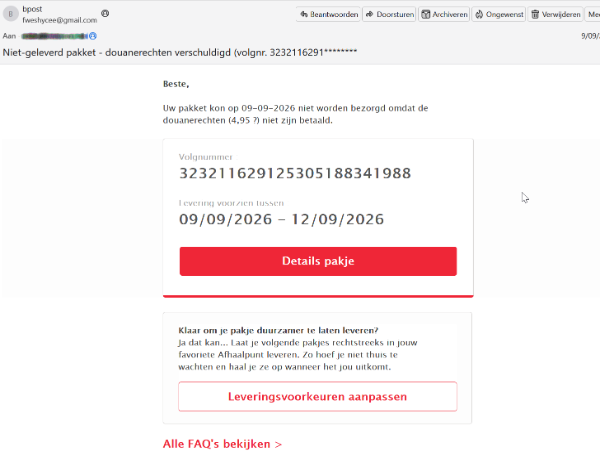
A fake bpost delivery email

A recent campaign targeting customers of the Belgian postal service bpost begins with an email claiming that a package could not be delivered because €4.95 in customs duties has not been paid.

A phishing email pretending to be from bpost, claiming €4.95 in customs duties is owed before a parcel can be delivered. 
A phishing email, in Dutch, pretending to be from bpost. 

In English, the subject and message read: 

Undelivered package—customs duties due (tracking no. 3232116291*******).

Your package could not be delivered on September 9, 2026, because the customs duties (€4.95) have not been paid.

The amount is small enough that recipients may pay without giving it much thought. However, the website does not stop at collecting the supposed fee. It asks for personal information, card details, and banking information.

How the scam works 

The link first passes through a URL-shortening service (hxxps://qr[.]paps[.]jp/1GWsa) before redirecting to a fake bpost site. The campaign used several fake bpost domains, including:

hxxps://bpost[.]be-pakje-ontvangen-nl-recevoir-colis-fr[.]my[.]id/

bpost[.]center, which is the domain shown in the screenshots below.

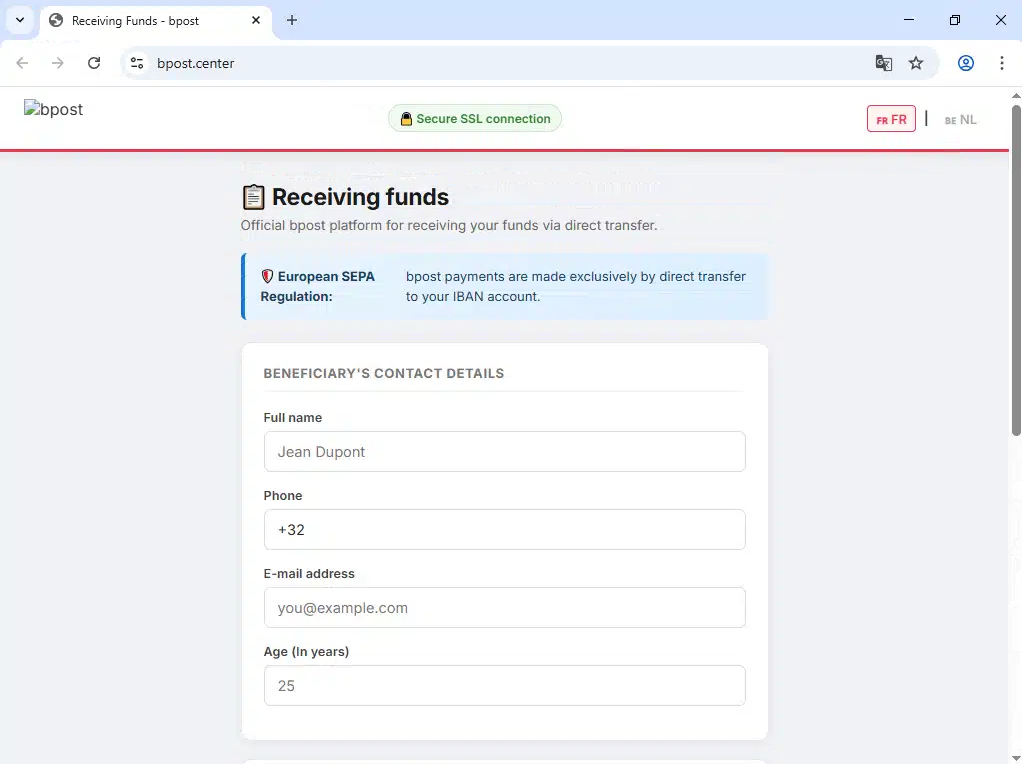
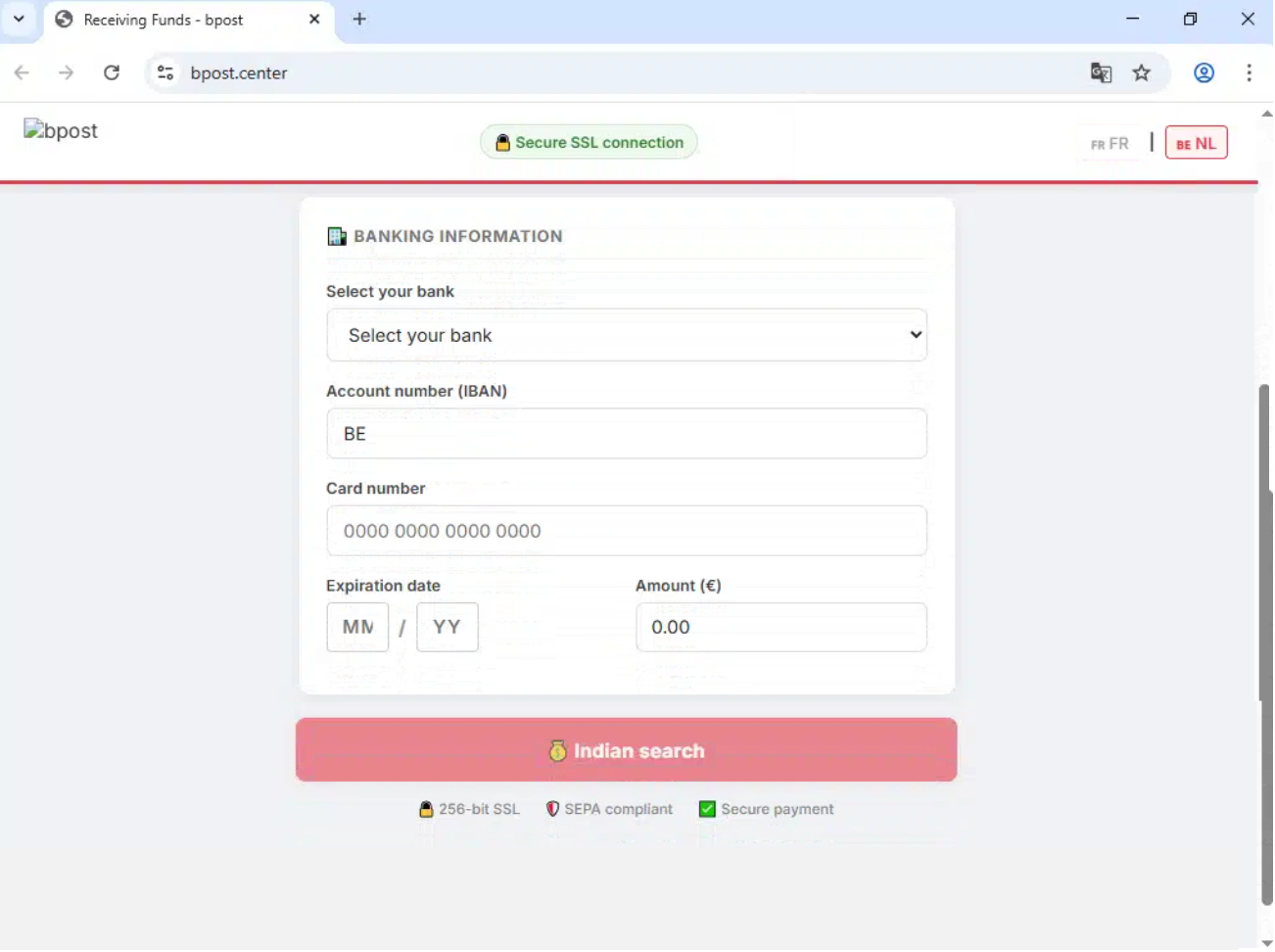
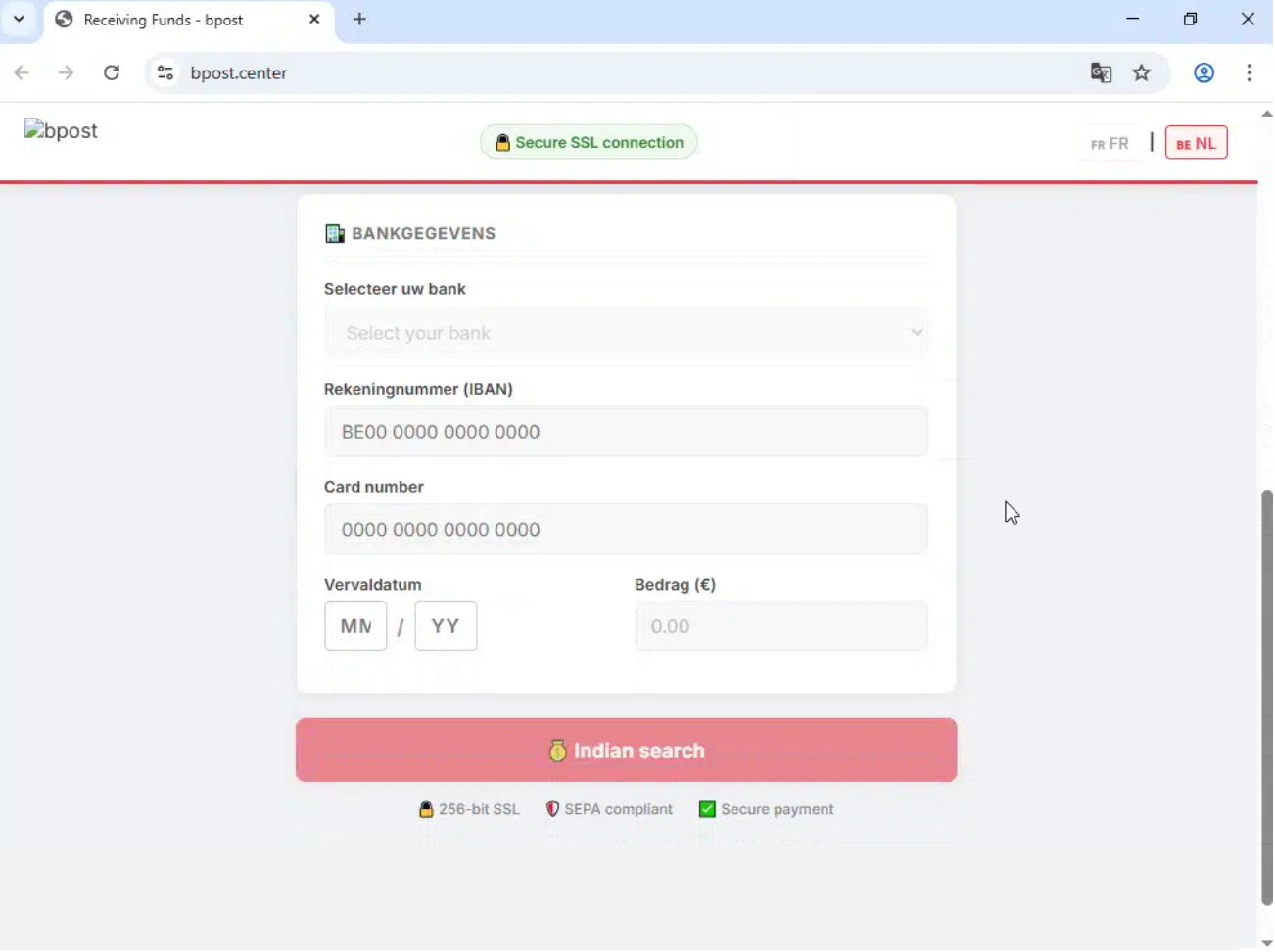
The page copies bpost’s branding and displays security claims such as “Secure SSL connection,” “256-bit SSL,” “SEPA compliant,” and “Secure payment.” These labels were added by the scammers and do not prove that the page or payment is secure.

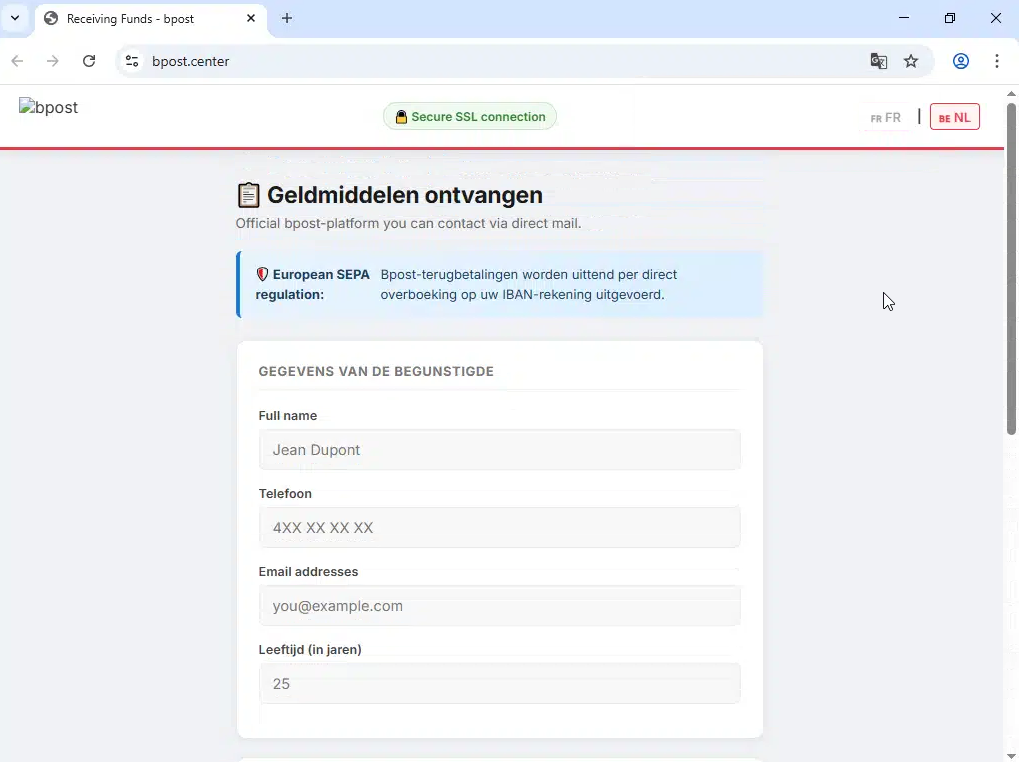
We’ve translated the screenshots below from the original Dutch into English.

The first page asks for the recipient’s name, phone number, email address, and age:

That reference to receiving funds does not match the email’s claim that a customs fee must be paid. The next page asks for an IBAN, card number, expiry date, and payment amount:

Then it asks for the real target: full card and bank details. 

The original Dutch version contained another mistake: One of its buttons read “Indian search” instead of “Betaal,” the Dutch word for “Pay.” Mistakes like this can expose a scam, but many phishing pages are built carefully enough that there will be no obvious typo or mistranslation.

Once submitted, card details may be used for fraudulent purchases or sold to other criminals. The personal and banking information may also be used to make later scams more convincing.

How to protect yourself 

  • Check delivery claims independently. Open the courier’s official app or type its website address into your browser, then use your tracking number to check the delivery. 
  • Check the sender and destination. A message may use a courier’s name while coming from an unrelated email address or linking to a different domain. 
  • Be wary of unexpected fees or refunds. A small payment or promised refund can be used to persuade you to provide much more valuable information. 
  • Be wary of requests for extensive financial information. A request for an IBAN as well as card details should be treated with suspicion, particularly when it supposedly relates to a small delivery fee.

If you entered your card or banking information on a suspicious site, contact your bank or card provider immediately. Freeze the affected card if your banking app allows it, monitor your accounts for unfamiliar transactions, and change any password you entered on the site.

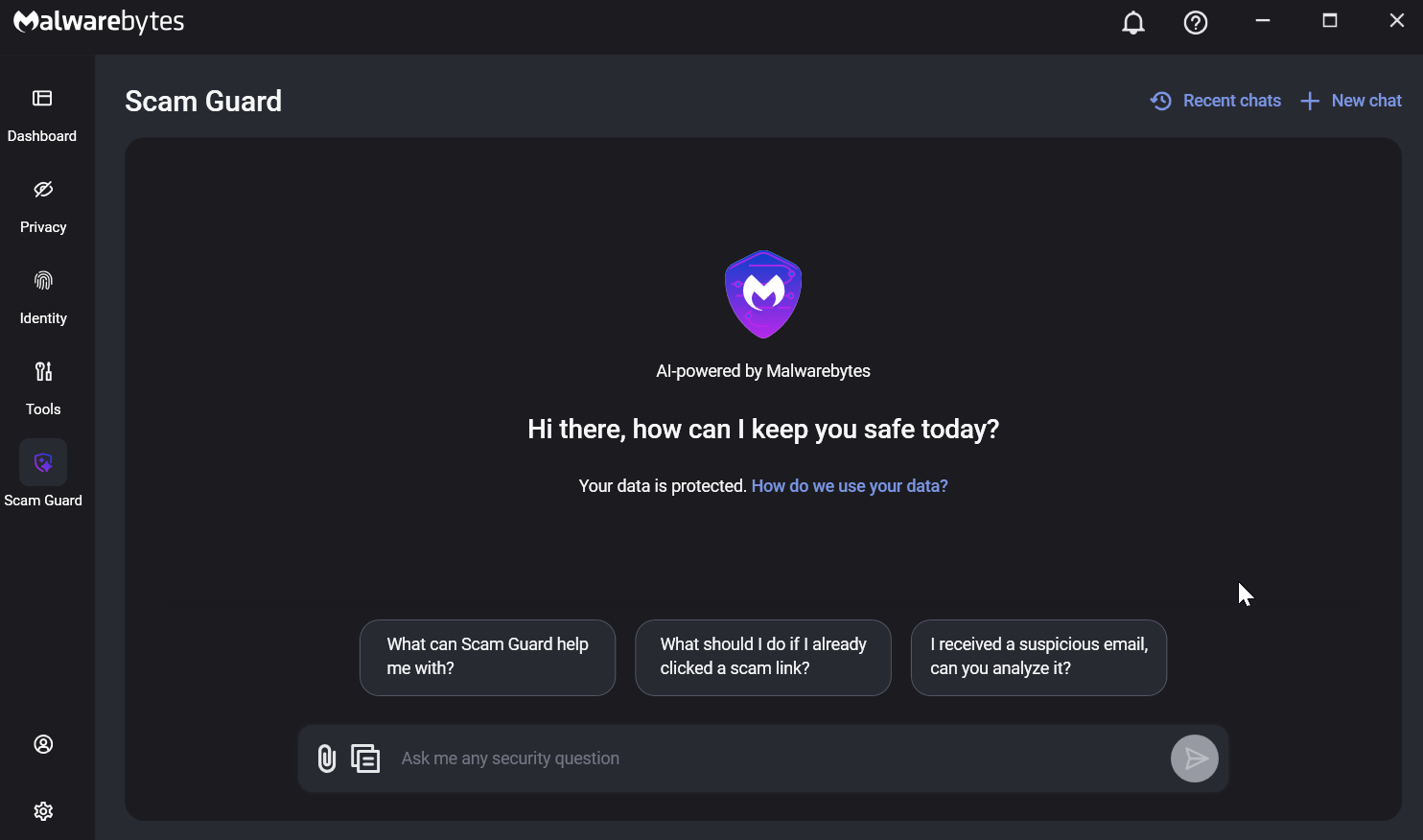
Malwarebytes tracks and blocks these campaigns as they appear. If you’re unsure about a message, Scam Guard—built into Malwarebytes for Windows, Mac, Android, and iOS—can check it for you. Paste in the message or link, or upload a screenshot, for an instant assessment.

Malwarebytes Scam Guard
Scam Guard can analyze a suspicious email, text, link, or screenshot and tell you whether it may be a scam.

Something feel off? Check it before you click.  

Malwarebytes Scam Guard helps you analyze suspicious links, texts, and screenshots instantly.  

Available with Malwarebytes Premium Security for all your devices, and in the Malwarebytes app for iOS and Android.  

Try it free →